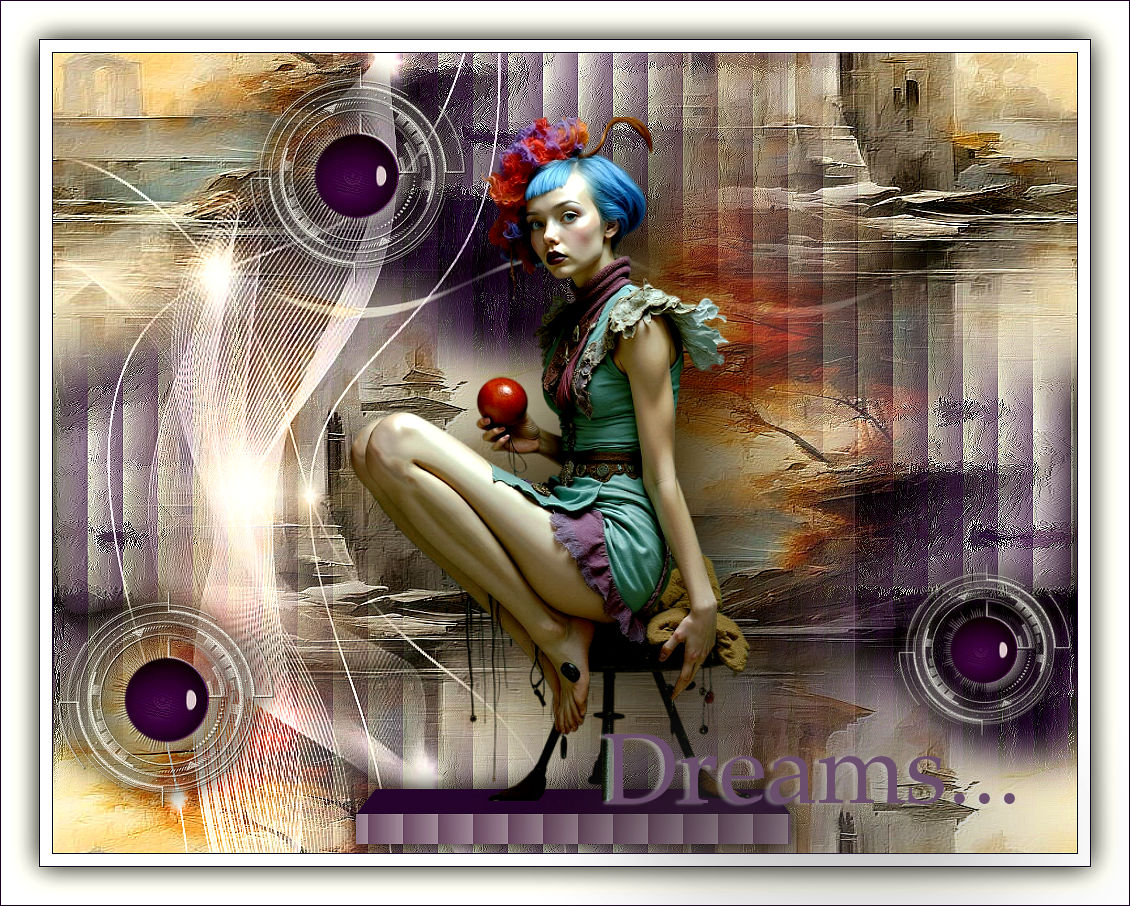
|
Dreams...
Material Aqui
Back; backbylc
179PaisagemByPqnaAlice\ MULHERES_NAISEM-2263
Seleção:dreamssel1byl
004DecorByPqnaAlice\ circuloacabamentobylc\
Decor:004DecorByPqnaAlice\ circulo acabamento by lc\Golden_Deco87J_Silvie_13.08.2024
Titulo:titulo bylc \ MarcaD'água
Plugins
Plugins \ Alien Skin \ Eye Candy 5 Impact \ Glass
Plugins Graphics Plus\ Emboss.
Plugins \ Alien Skin \ Eye Candy 5 Impact \ Extrude.
Tutorial elaborado no PSP 2022.
Tutorial Dreams...
1- Abrir o material no PSP, duplique e feche o original.
2-Abrir o arquivo backbylc.
3- Effects\ Texture Effects\ Blinds
( escolha uma cor usada no back , usei #3a144d )
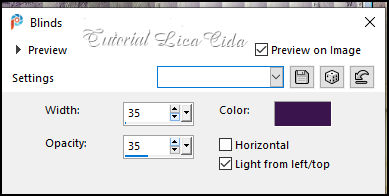
Adjust \ Sharpness \ Sharpen.
4-Selections \ Load/Save Selections \ Load Selection From Disk:
dreamssel1bylc
Selections \ Promote Selection to layer.
Selections \ Select None.
Layers \Duplicate
Na layers duplicada _copy of Promoted Selection:
5- Plugins \ Alien Skin \ Eye Candy 5 Impact \ Glass:
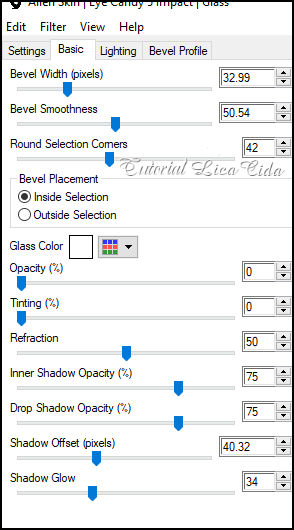
6-Effects \ 3D Effects \ Drop Shadow: 0, 0, 100,
40,00. Color: #000000
_aplicar nas duas layers do efeito
7-PS-Deletar a layer Promote Selection.
8-Layer topo \ Layers\New Raster Layer.
9-Selections \ Select All. Edit \ Copy no Misted Paisagem\
179PaisagemByPqnaAlice. Edit \ Paste Into Selection.
Selections \ Select None.
Adjust \ Sharpness \ Sharpen.
10-Effects \ Image Effects \ Seamless Tiling: Default.
11-Plugins Graphics Plus\ Emboss.
12-Edit \ Copy no Golden_Deco87J_Silvie_13.08.2024.\Edit \ Paste as
New Layer. ( copy of tube )
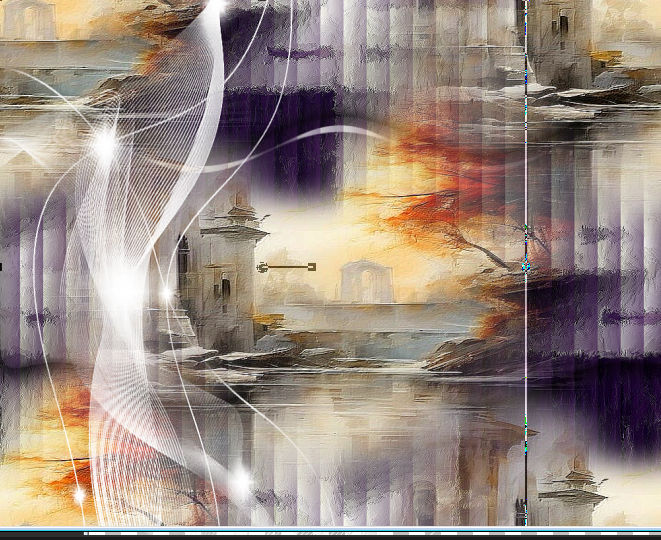
13-Com a Ferramenta Pick Tool: Position X: 2, Position Y: 100.
Ficará como print abaixo.
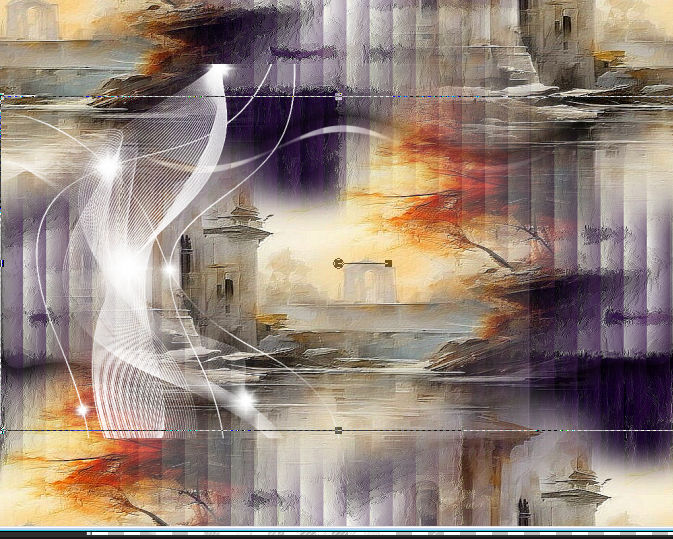
_Com a mesma ferramenta Pick Tool use o efeito
como modelo _suba ao topo e desça ao final do back
14-Plugins Graphics Plus\ Emboss.
_ Layers \ Properties \ General \ Blend Mode: Luminance ( L ) -
Opacity: 100%
15-Edit \ Copy no Decor004DecorByPqnaAlice ,Edit \ Paste as New
Layer. ( Raster 3 )
-Com a Ferramenta Pick Tool: Position X: 154 PositionY: -28
16-Layers duplicate
-Com a Ferramenta Pick Tool: Position X: -38 PositionY: 496
17-Layers duplicate
Image Resize 80%
-Com a Ferramenta Pick Tool: Position X: 811
PositionY: 477
Effects \ 3D Effects >\ Drop Shadow: 0\ 0\ 100\ 30, 00, Color:
#000000 _Opcional
( se usar aplique nos outros Decor)
18-Edit \ Copy no circulo acabamento by lc.\Edit \ Paste as New
Layer.
Acomodar no centro de cada Decor.
Effects \ 3D Effects \ Drop Shadow: a gosto
Layers\ Merge Down ( aplicar em todos os decor)
no Decor menor faça um resize de 80%
19- Layers Background_ Seleçao Personalizada (
teche S)
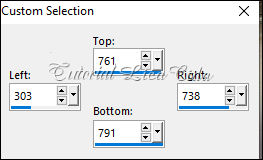
Promote Selection to Layer.Preencher com a color
#6b4e6d.
Layers Arrange Bring to Top
20- Effects\ Texture Effects\ Blinds ( repetir ítem 3 \ mudando a
color para #ffffff ( branco)
Selections \ Select None
21-Plugins \ Alien Skin \ Eye Candy 5 Impact \ Extrude.
(color #3a144d ).
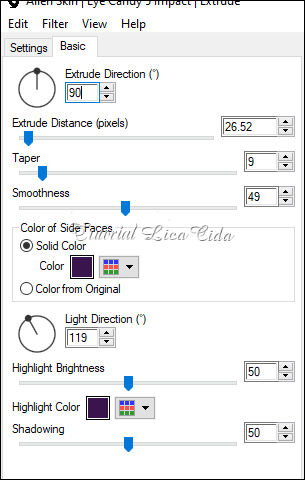
Selections Select None.
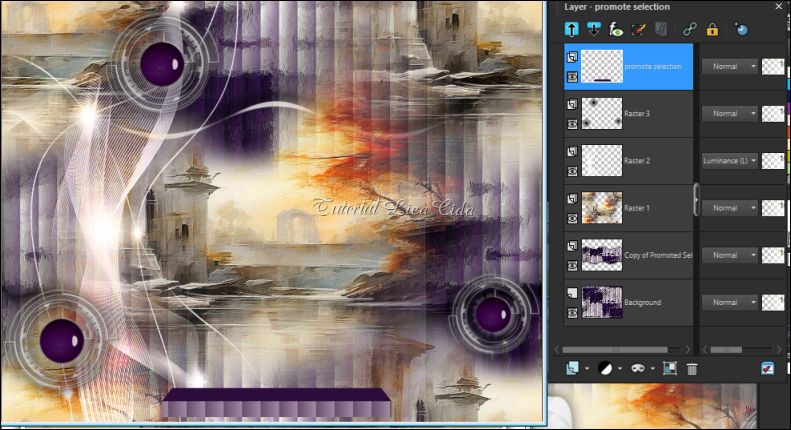
22-Edit \ Copy noEdit \ Copy no tube
MULHERES_NAISEM-2263\ Edit \ Paste as New Layer.
Posicione sobre o efeito Extrude( use a gosto)
Image \ Add Borders \ Symmetric:
1 px - color: #3a144d
12 px - color: Background #ffffff
1 px - color: Foreground #3a144d b
Selections \ Select All.
Image \ Add Borders \ Symmetric: 38 px - color: #ffffff
Effects \ 3D Effects \ Drop Shadow: 0, 0, 100, 40,00, Color: #000000
Selections \ Select None.
1 px - color: #3a144d
Aplicar sua marca d'água ou assinatura.
File \Export \ JPEG Optimizer
setembro de 2025.
Rio de Janeiro_Brasil
:::...VOLTAR...::: |